


Attio Review 2026: We Test the Object-Based CRM of the Future
TL;DR
• Attio is an object-based CRM you shape around your workflow.
• Lists power the day-to-day, while AI attributes and workflows keep your data clean with less manual effort.
• Great for fast-changing GTM teams; less ideal if you want a pre-built, out-of-the-box structure.
• A generous free plan is available for up to 3 users. Paid plans start at $29/user/month.
Attio is a flexible, object-based CRM built for modern go-to-market (GTM) teams who hate rigid software. Instead of forcing you into preset modules, Attio lets you model your workflow from scratch, and its AI keeps data clean without constant babysitting. Lists, not pipelines, drive the UX, making it useful far beyond sales.
Our Attio review shows how that flexibility plays out in real use.
Why you can trust CRM.org
Every CRM review we publish is hands-on, not hypothetical. We sign up, build pipelines, import data, test automations, and run real workflows to see how each feature performs under daily use. We score tools across core functionality, standout features, ease of use, onboarding, support, integrations, and value for money.
What is Attio?
Attio is an object-based CRM where you build the structure yourself—contacts, companies, deals, partners, even custom objects. Lists act as your workspace for sorting, filtering, and segmenting data, while pipelines are simply one view layered on top.
Attio CRM features include AI-enriched attributes, multi-step AI workflows, collaborative notes, shared timelines, and a modern API that teams can actually build on. It’s designed for fast-moving teams who need a CRM that evolves with their process.
Pros
- Flexible objects and fields for modeling any workflow
- Lists-based UX that adapts to sales, CS, partnerships, or fundraising
- AI Attributes and AI Workflows that reduce manual data upkeep
- Real-time collaboration with comments, activity feeds, and shared views
Cons
- Requires upfront setup before it feels “shaped”
- Not ideal for teams wanting a predefined sales CRM
- Some advanced workflow designs require experimentation
Pricing
Free forever plan available for up to 3 users. Paid plans start at $29/user/month, billed annually.
Who Attio is best for (and who should skip)
Attio calls itself “the CRM of the future,” and after testing it, that tagline truly does make sense. It’s built for teams whose workflows don’t sit neatly inside a traditional sales pipeline. If your process changes every quarter—or every sprint—Attio’s flexible objects and lists keep up without forcing a rebuild. It feels like a living system, not a fixed template.
Attio is best for:
- Startups and modern GTM teams that need a CRM that evolves with their playbook
- Partnerships, fundraising, and CS teams who don’t work in classic deal stages
- Operators and RevOps who want clean, structured data without writing scripts
- Teams embracing AI for enrichment, summarization, and automated workflows
Attio isn’t ideal for:
- Teams wanting a prebuilt, sales-first CRM with strong defaults and rigid guidance
- Organizations needing enterprise layers like territory management, quota plans, or advanced forecasting
- Teams wanting minimal configuration before onboarding reps
If you want a CRM that tells you exactly how to work, Attio may feel too open-ended. But if you want a system you can mold—and that gets smarter as your data grows—it’s an unusually future-proof choice.
Attio review
Attio’s feature set feels intentionally lightweight on the surface, but once you start building, you notice how much is happening under the hood. Everything centers around objects, lists, and AI-assisted data management. Here’s a quick, skimmable look at the core Attio CRM features before we dive deeper later in this Attio review.
Key Attio CRM features
- Custom Objects: Model contacts, companies, deals, or entirely new data types your workflow needs.
- Lists-Based Workspace: Filter, sort, and segment records in real time without rebuilding views.
- Pipelines as Views: Visualize any list as a Kanban pipeline without changing the underlying data.
- AI Attributes: Auto-summarize notes, enrich records, and generate consistent fields across objects.
- AI Workflows: Automate multi-step actions using AI-powered triggers instead of rigid logic trees.
- Shared Timelines: See emails, notes, calls, and activity in one collaborative view per record.
- Real-Time Collaboration: Comment, mention teammates, and edit views together without sync delays.
- Custom Fields: Add structured data to any object—dropdowns, numbers, relationships, formulas.
- API & Integrations: Build on Attio’s modern API or connect external tools through native options.
- Import & Sync Tools: Bring in CRM data, spreadsheets, and email activity with guided mapping.
Objects, lists, and the data model
Attio’s data model is where you immediately feel the difference between a classic CRM and something built for teams who don’t want to fight their system. Everything starts with objects—flexible containers you shape around the way your business works, not the other way around.
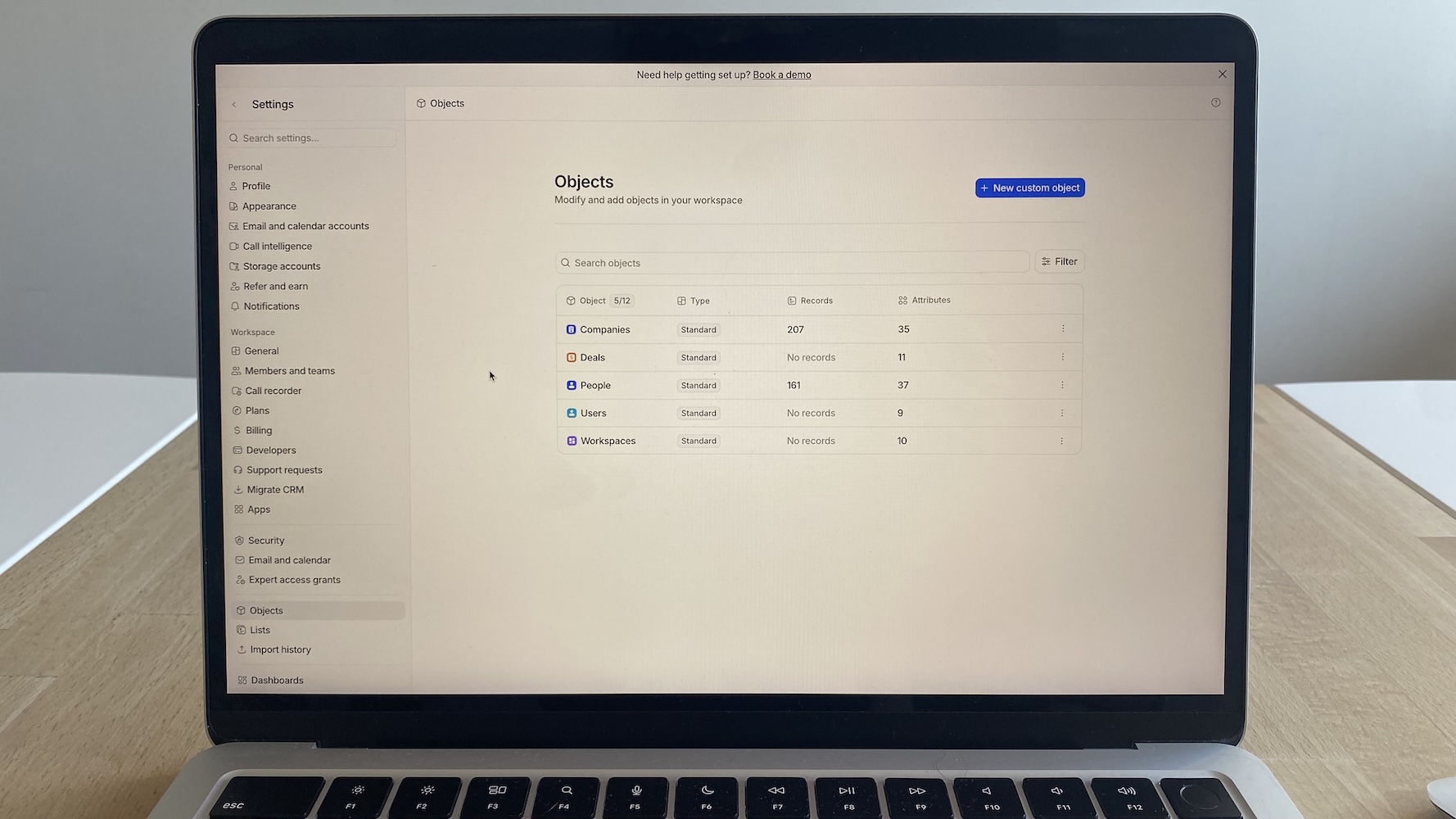
Creating new objects is fast enough that you almost need to slow yourself down. In testing, I spun up Investors, Partners, and Properties in minutes, complete with custom fields and relationships. The power is real; the trap is creating more objects than your team can maintain.
Lists are Attio’s everyday workspace. They behave like a hybrid of a spreadsheet and a CRM view. Switching a list from table to kanban or calendar feels instantaneous, and reshaping fields doesn’t require admin privileges.
Collaboration is smooth, too; teammates can adjust columns or filters without overwriting someone else’s workflow. But lists age quickly if no one curates them. Without private lists and simple team norms, you’ll end up with far too many views competing for attention.
Contact & company management
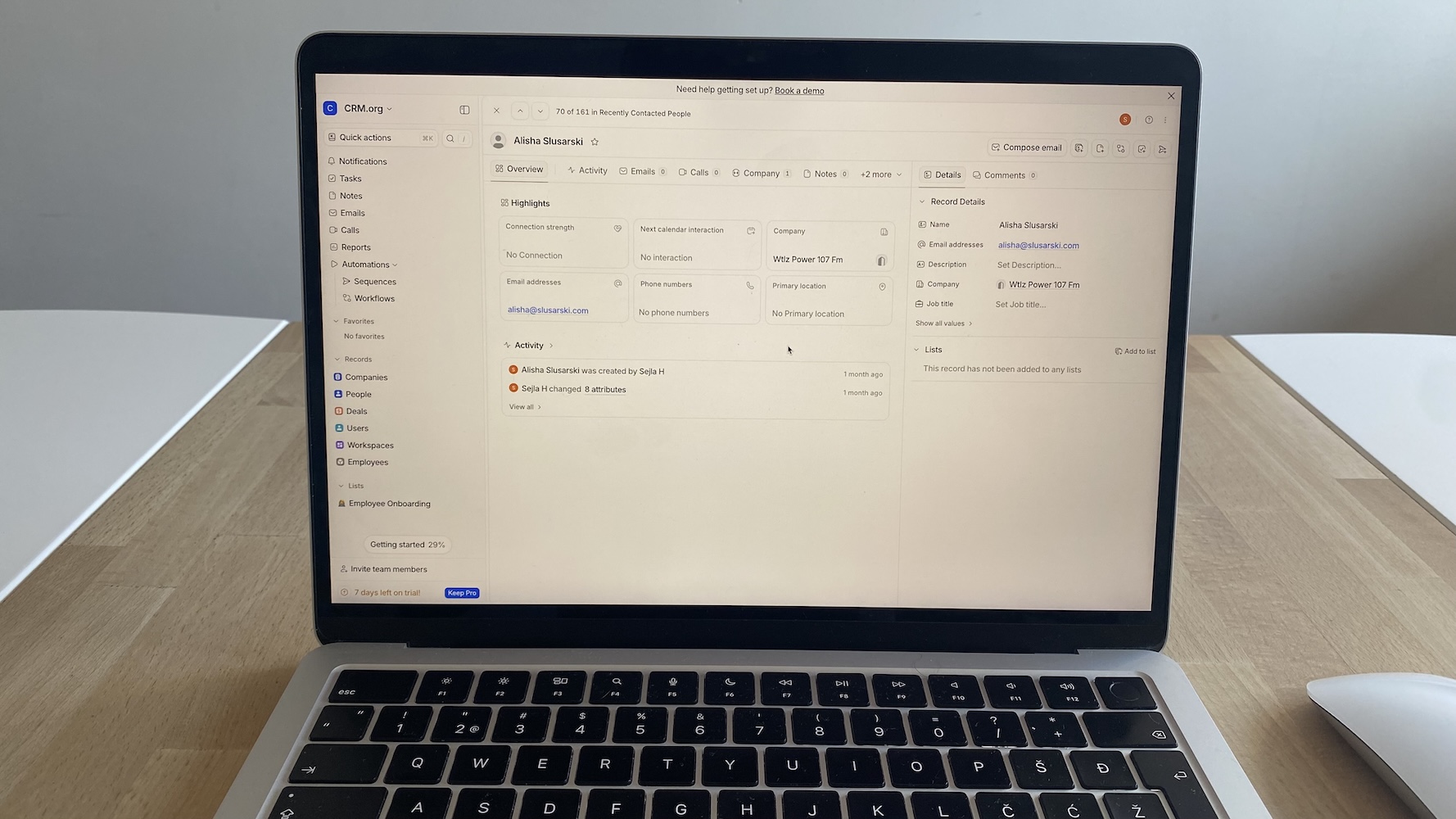
Attio does a lot of the quiet, unglamorous work that makes relationship management feel lighter. People and Companies share a unified timeline, so every email, meeting, note, and list change lands in one place.
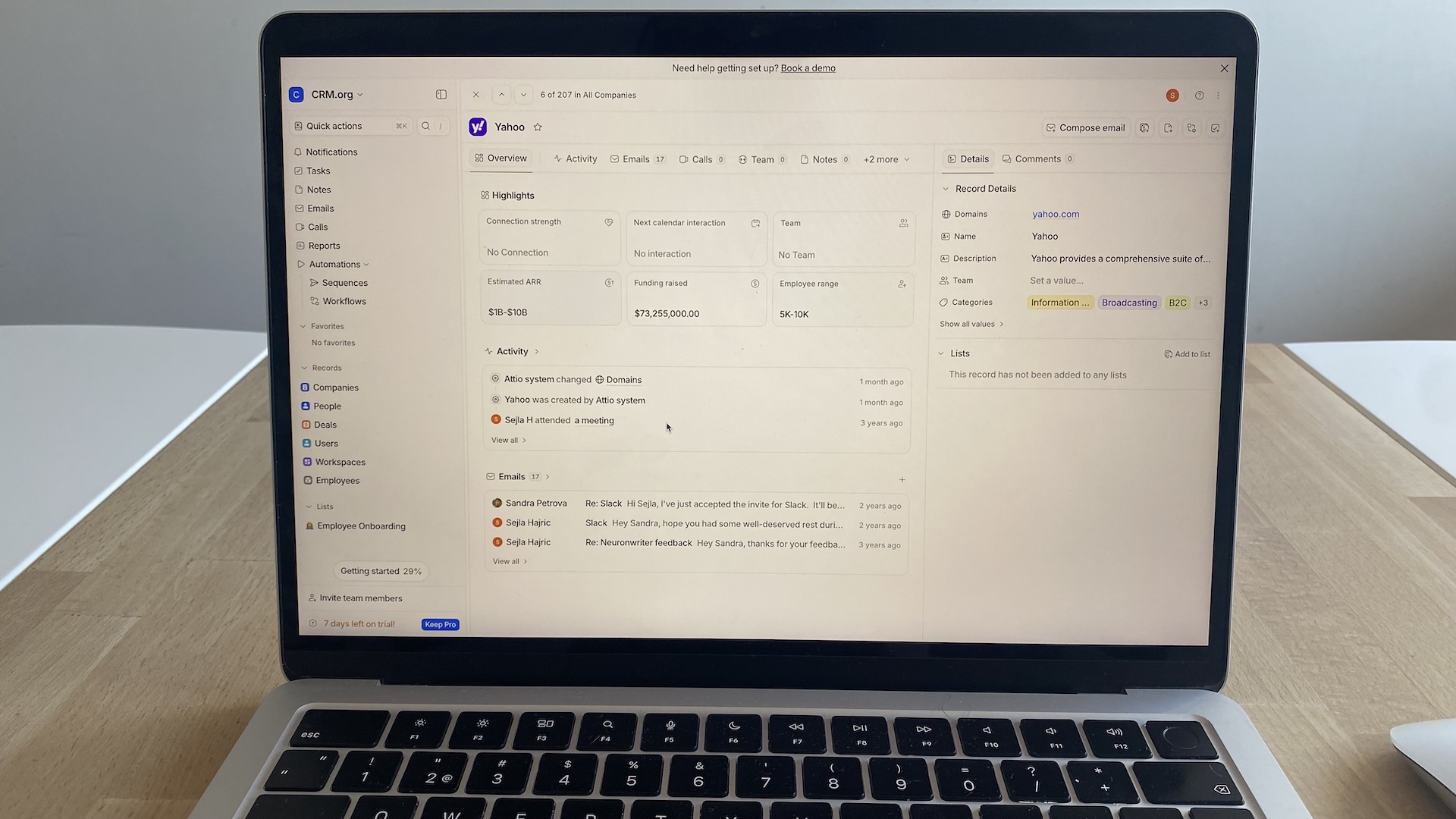
Custom fields are fast to create and genuinely flexible. You can add dropdowns, formulas, relationships, or AI fields that summarize long threads or classify contacts automatically. These AI attributes save real time, but they’re not magic; you’ll still want a quick scan to confirm tone or accuracy on sensitive accounts.
Imports are painless, and Attio’s dedupe logic is stricter than most CRMs I’ve tried. It catches subtle duplicates—same person, slightly different signature—before they snowball. List filters make segmentation easy, especially when you combine static fields with AI-generated ones.
The limitation is human discipline and adjustment. Attio won’t stop your team from inventing overlapping fields or tagging inconsistently, and there’s no traditional “search bar” inside People or Company views. You’re expected to filter lists instead. But, with a few naming rules and saved views in place, records can stay clean with little to no effort.
Pipelines & deals (sales workflow)
Attio’s pipelines feel fast, lightweight, and strangely non-CRM-like—in a good way. That’s because a pipeline isn’t a separate module; it’s just a list switched into kanban view. You’re working with the same underlying data, simply viewed through a different lens. It’s a small shift with big benefits for teams whose sales process doesn’t follow a straight line.
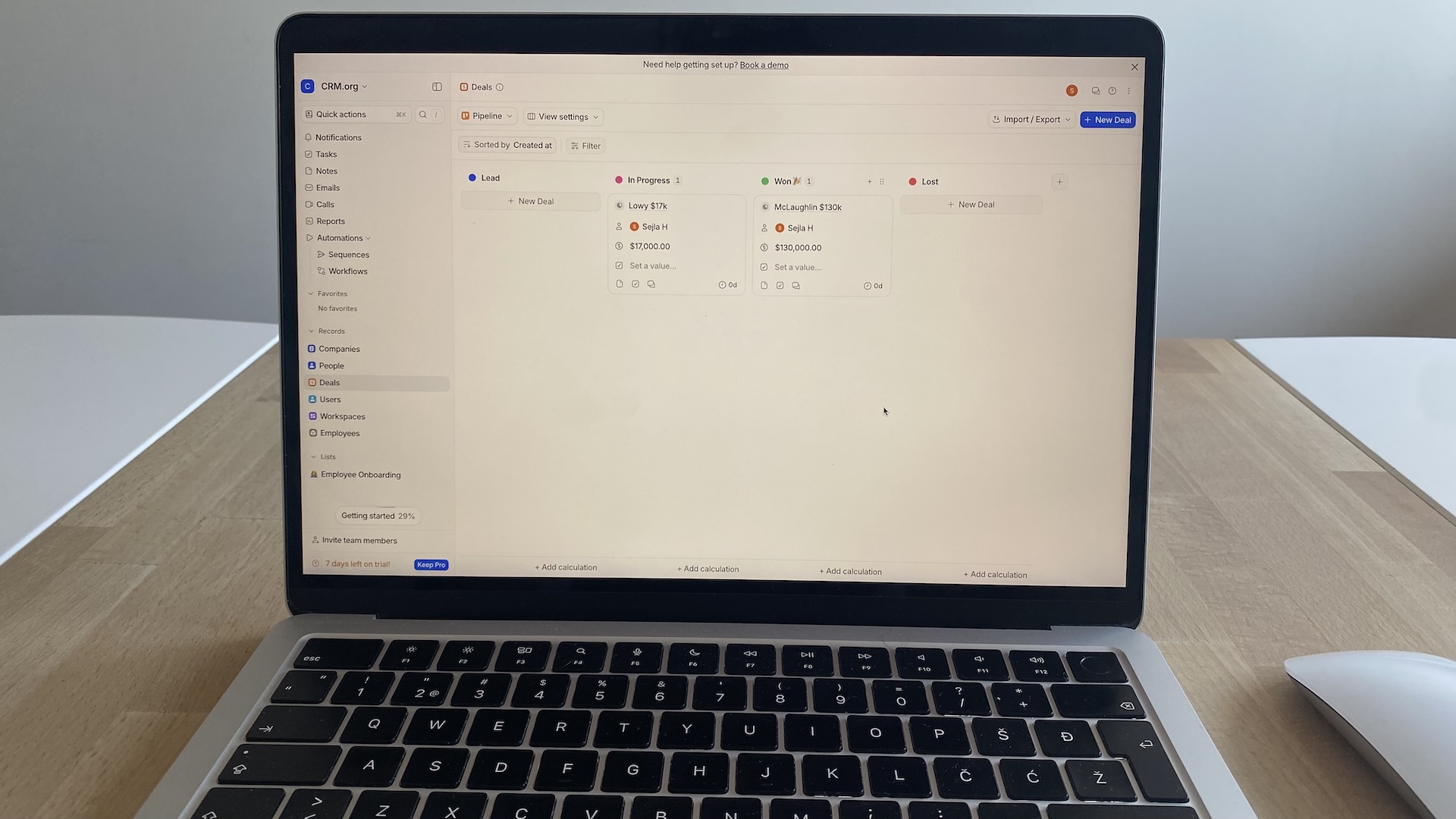
In testing, drag-and-drop updates were instant, even with large deal volumes. Bulk edits worked the way you hope they will: select a handful of cards, update fields once, and Attio pushes changes everywhere they belong. Per-pipeline fields help you tailor stages for different motions—new business, renewals, partner deals—without stacking unnecessary fields on every object.
Deal records stay clean because they inherit context from linked objects. Connecting a deal to an Account, Project, or Partner unlocks richer timelines and more accurate reporting. Lost reasons feed directly into list filters, so identifying patterns takes seconds.
The limitation is structure: Attio won’t hand you a prescriptive pipeline. If you need strict stage definitions or lifecycle rules enforced by the system, you’ll have to build that yourself. For teams comfortable shaping their own process, though, Attio’s pipelines feel like a welcome upgrade.
Attio Sequences
Attio Sequences bring simple, everyday outreach into the CRM without making you learn another engagement tool. You can build multi-step email flows with time delays and personalization tokens pulled straight from your objects.
Setup is quick because sequences behave like everything else in Attio—list-driven, flexible, and easy to adjust. They’re linear, though, so don’t expect branching logic or conditional paths.
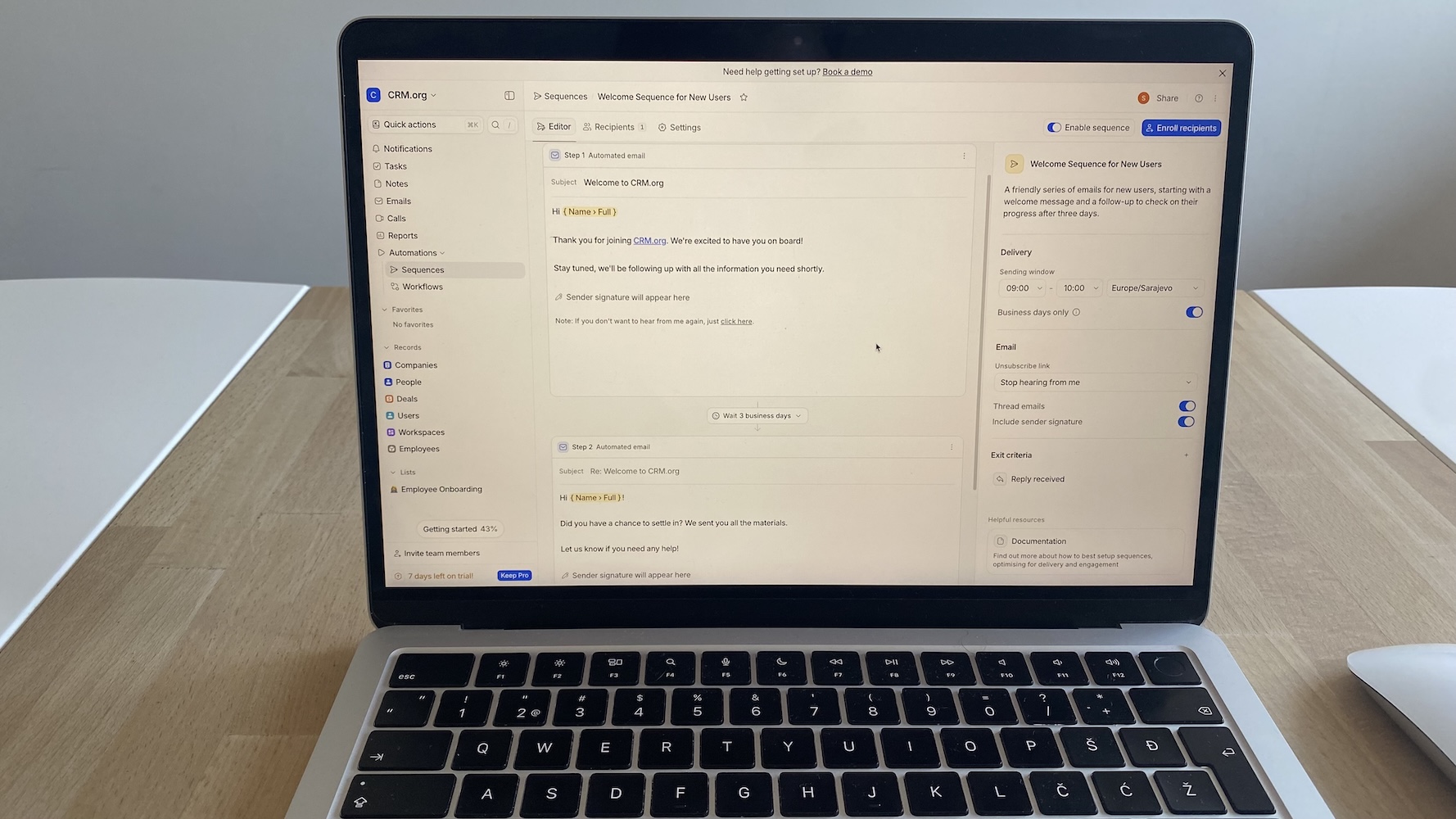
During testing, enrollment depended on where you started. From within a sequence, contacts had to be added manually by typing names. Bulk enrollment was only available from the People view. It works, but the inconsistency adds friction if you’re building or adjusting sequences frequently.
Emails send from each user’s connected inbox, which helps with deliverability but rules out shared sending pools or power-outbound tactics. That same “context over volume” approach shows up elsewhere, too. After I wrote the first email, Attio correctly inferred it was a welcome message and auto-named the sequence “Welcome Sequence for New Users.”
The limitation is scope. Attio Sequences aren’t built for high-volume outbound or multi-channel cadences. There’s no SMS, no dialer, and no A/B testing. Editing a sequence doesn’t retroactively update people already enrolled, which matters if your team iterates often.
AI, workflows, and automation
Attio’s AI Attributes act like living fields that summarize emails, classify records, or extract details from messy conversations. In testing, they handled multi-thread email chains better than expected, though long threads with mixed topics sometimes produced summaries that needed a quick human touch. The advantage is speed: a rep can skim a deal’s entire history in seconds. These fields stay editable and auditable, so AI never overwrites your source of truth.
Attio Workflows feel equally integrated. You can trigger actions on field updates, stage changes, object creation, or time-based conditions, and insert AI steps that classify, summarize, or fill fields automatically. Attio handles common sales tasks—routing, enrichment, follow-ups—without needing Zapier. The run history is clear, and failures surface quickly, which helps teams trust the automation.
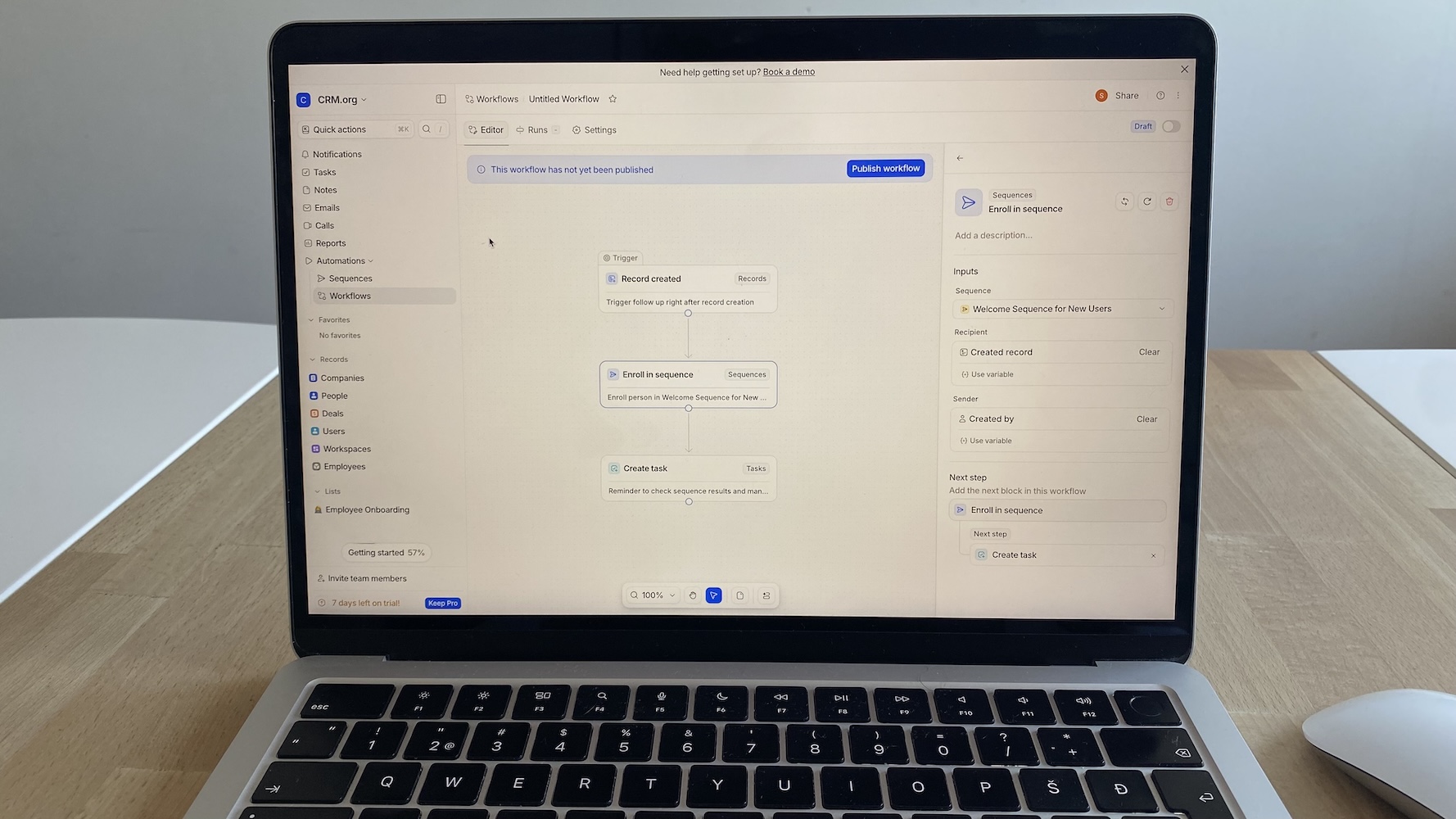
The limitation is depth. Attio’s workflow builder is powerful for everyday GTM motions but isn’t a full replacement for heavyweight logic engines. Multi-branch sequences, approval flows, or strict SLA timers may still require an external automation layer. For most startup and growth teams, though, Attio’s built-in automation removes far more manual work than it creates.
Attio integrations
Attio covers the essentials well: Google and Microsoft email/calendar sync, Slack notifications, and importers for most major CRMs. These integrations feel stable and don’t require the ritual troubleshooting you see in older platforms.
Attio goes beyond basic syncs with a dedicated Apps area inside settings, where integrations are organized by use case—forms, data enrichment, calling, analytics, and product workflows. It’s not a massive marketplace, but it’s clearly more than a handful of hard-coded connections. The apps that are available feel intentional and tightly scoped to how Attio is actually used.
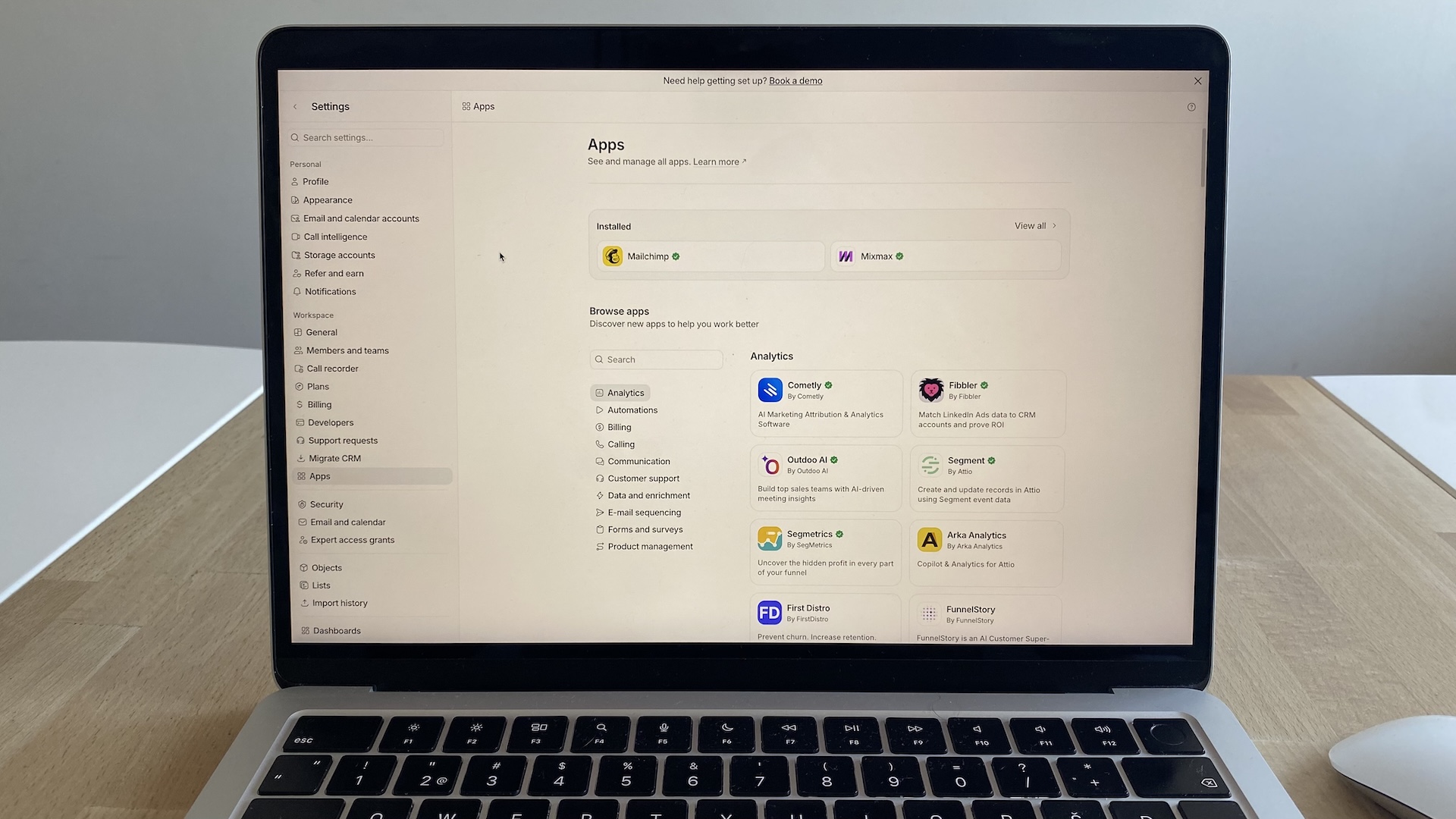
That said, the ecosystem is still growing. You won’t find dozens of overlapping tools for every category, and some advanced or niche workflows still require Zapier or custom API work. The upside is consistency: the apps that do exist install cleanly, respect Attio’s data model, and don’t feel bolted on.
The limitation is breadth, not maturity. Teams with complex marketing stacks or heavy RevOps pipelines will still have to build some custom plumbing. But for most GTM teams, Attio integrations cover common needs and leaves a clear path to extend the platform without turning integrations into a maintenance project.
Attio alternatives
Attio sits in a unique spot: flexible, modern, and schema-free. But there are a few tools that scratch similar itches—especially if you want structure out of the box or deeper automation. Here are the strongest Attio alternatives and how they compare.
Airtable
Airtable is the closest match to Attio’s “objects + views” foundation. You can model anything—contacts, deals, investor updates—and switch between grids, galleries, calendars, and kanban. It’s better if you want raw flexibility and don’t mind assembling your own CRM logic. But you’ll eventually feel the gaps: no native timelines, limited relationship depth, and automations that need careful upkeep.
Notion
Notion works well as a starter CRM because its databases are easy to shape, link, and duplicate. You can build contact tables, deal boards, and meeting notes in a single workspace. But Notion hits its limits fast: no automated enrichment, no scalable permissions, and no CRM-native history of emails or activity. It’s excellent for early scrappiness, not long-term operational rigor.
Folk CRM
Folk is a lighter, relationship-oriented alternative for founders, recruiters, and partnerships teams. It shares Attio’s list-first UX and collaborative simplicity. Set up takes minutes, and the Chrome extension pulls contacts straight from Gmail or LinkedIn. But Folk doesn’t offer custom objects, deeper automation, or multi-team workflows.
HubSpot CRM
HubSpot isn’t flexible like Attio, but it offers guided pipelines, strong email tools, and built-in marketing automation. It’s ideal if you want a turnkey sales engine. But custom objects are limited, workflows get pricey, and the system becomes rigid as your processes evolve.
Attio pricing
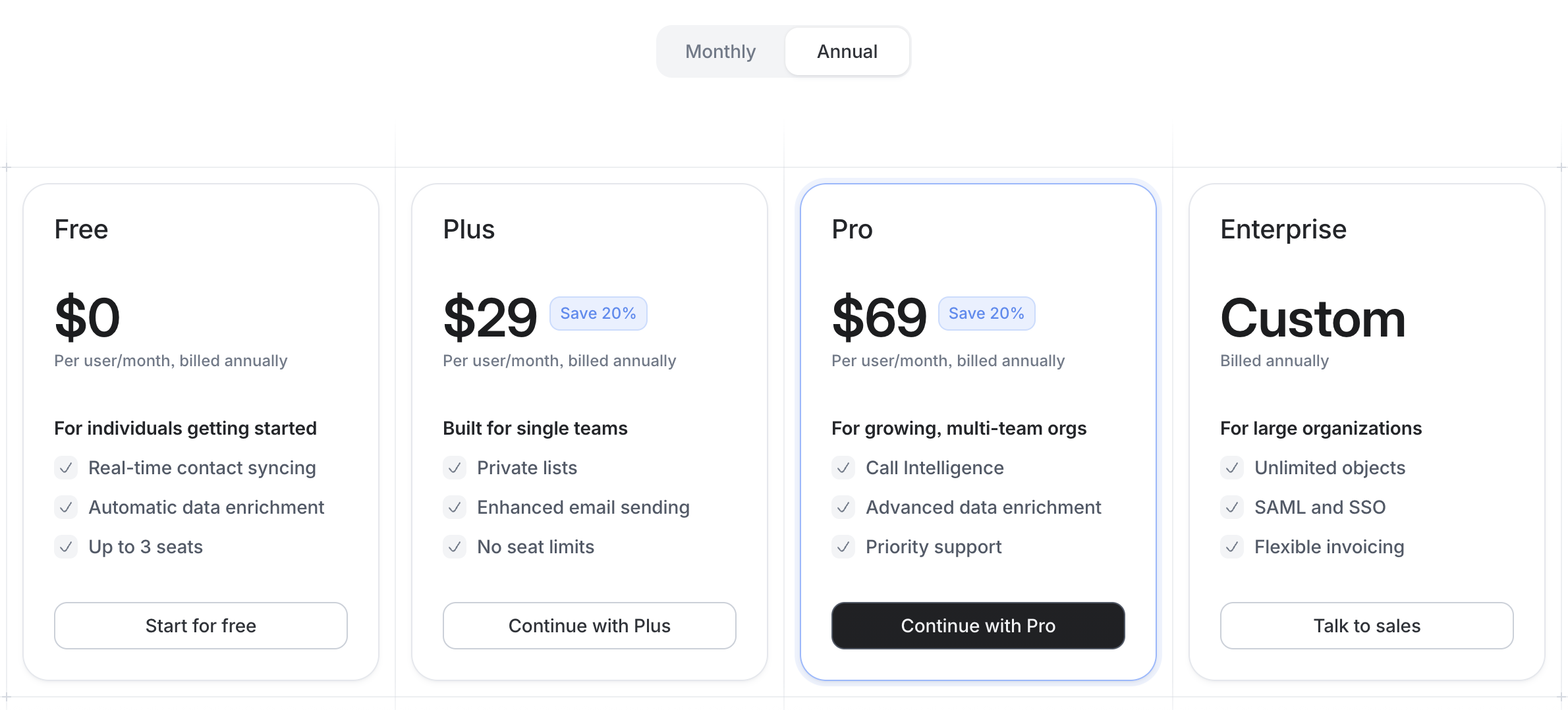
Attio’s pricing is refreshingly clear, and each tier unlocks meaningful capability rather than arbitrary upsells. The biggest differences come down to: object limits, email volume, AI/automation depth, and collaboration features.
Free ($0/user/month, billed annually)
The Free plan is generous for individuals or tiny teams testing the waters. You get real-time contact syncing, automatic enrichment, basic communication intelligence, and up to three seats. You can create up to three objects, store 50,000 records, and send 200 emails per month.
What’s missing: private lists, custom objects, AI workflows, email sequences, and multi-account email sync.
Plus ($29/user/month, billed annually)
Plus is built for single teams that need privacy controls and stronger communication tools. You get private lists, enhanced email sharing, 1,000 sends per user per month, and up to five objects. Access permissions tighten up, and enrichment gets more depth.
What’s missing: no custom objects, no Call Intelligence, no advanced reporting, and no multi-team structure.
Pro ($69/user/month, billed annually)
Pro is Attio’s sweet spot for growing orgs. You unlock Call Intelligence, advanced enrichment, email sequences, and up to 12 objects—enough to model complex workflows. You also get advanced access permissions, two email accounts per user, and 10,000 automation credits included.
What’s missing: unlimited objects, enterprise-grade SSO, and large-scale reporting customization.
Enterprise (Custom pricing)
Enterprise unlocks everything: unlimited objects, unlimited teams, SAML/SSO, flexible invoicing, and the full reporting suite. Email volume and automation credits scale with your contract. This plan requires a sales conversation and won’t be cost-efficient for smaller teams.
How to get started with Attio CRM
If you’re curious about Attio but not sure where to begin, start by checking whether its flexibility matches how your team works day to day. Attio is a great fit when your processes shift often and you want a CRM that can shift with you. If you prefer a strict, sales-first playbook, you may feel more supported in something more prescriptive.
When you’re ready to test it, keep your setup intentionally small. Create only the core objects you truly need, map how they relate, and build a few everyday lists to anchor your workflow. Turn on AI Attributes early so your data stays clean without extra effort, then run one real process through Attio for two weeks before expanding.
Take it step by step. Attio works best when it grows with you, not when you try to perfect it on day one.
Attio FAQs
Will my team actually adopt something this flexible, or will it confuse them?
Attio can feel “too open” if you let everyone build their own thing. The key is guardrails: define 3–4 core objects, a handful of standard lists, and a simple usage doc before inviting the whole team. When the structure is agreed upon up front, Attio feels freeing, not chaotic.
How hard is it to migrate from our existing CRM without breaking everything?
The migration itself is straightforward. Attio’s importer handles large CSVs, enrichment fills gaps, and relationships can be mapped cleanly. The real friction happens before import: cleaning fields, removing duplicates, deciding which objects translate 1:1, and which shouldn’t exist anymore. Budget time for a cleanup sprint. Attio rewards teams who don’t rush this step.
Are Attio’s reporting and forecasting strong enough for leadership?
Attio’s reports are solid for pipeline visibility, segment performance, and activity trends, but it’s not a Salesforce-style BI layer. If you need complex revenue modeling, territory rollups, or board-ready dashboards, you’ll likely export to a warehouse/BI tool. For most startups and growing teams, Attio’s built-in reporting is enough.